目次
settings.json を表示する
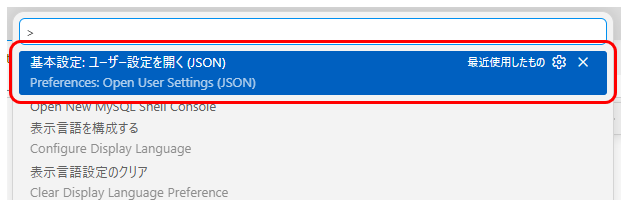
Ctrl + Shift + P を押下して Preferences: Open User Settings (JSON) を開きます。
コードの文字の色を変更する
Ctrl + Shift + P を押下して Preferences: Open User Settings (JSON) を開きます。
コメントの色
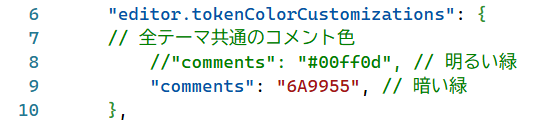
editor.tokenColorCustomizations を変更します。
    "editor.tokenColorCustomizations": {
    // 全テーマ共通のコメント色
        //"comments": "#00ff0d", // 明るい緑
        "comments": "6A9955", // 暗い緑
    },
以下のような色になります。
ダークモードにする
Ctrl + Shift + Pを押して、以下を検索します。
配色テーマ
お勧めは「ハイコントラスト ダーク テーマ」です。

こんな感じでくっきりとコードが確認できます。ストレスも少なそうですね。

おススメの settings.json の内容
コード
{
  // =========================================================
  // VSCode 基本設定
  // =========================================================

  "extensions.ignoreRecommendations": true,
  "workbench.startupEditor": "none",
  "security.workspace.trust.untrustedFiles": "open",
  "explorer.confirmDelete": false,


  // =========================================================
  // テーマ
  // =========================================================

  "workbench.colorTheme": "Default High Contrast",

  "workbench.colorCustomizations": {
    // エディタ
    "editor.background": "#000000",
    "editor.foreground": "#FFFFFF",

    // 行番号
    "editorLineNumber.foreground": "#FFFFFF",
    "editorLineNumber.activeForeground": "#FFFF00",

    // カーソル
    "editorCursor.foreground": "#FFFFFF",

    // 選択範囲
    "editor.selectionBackground": "#005FFF",
    "editor.inactiveSelectionBackground": "#9694ff",

    // インデントガイド
    "editorIndentGuide.background1": "#606060",
    "editorIndentGuide.activeBackground1": "#FFFFFF",

    // ターミナル
    "terminal.background": "#000000",
    "terminal.foreground": "#FFFFFF",

    // サイドバー等の文字も明るくする
    "sideBar.foreground": "#FFFFFF",
    "activityBar.foreground": "#FFFFFF",
    "tab.activeForeground": "#FFFFFF"
  },


  // =========================================================
  // ソースコードの色
  // =========================================================

  "editor.tokenColorCustomizations": {

    "comments": "#00FF0D",
    "strings": "#FFFF00",
    "numbers": "#00FFFF",
    "keywords": "#FF66FF",
    "variables": "#FFFFFF",
    "functions": "#00FFFF",
    "types": "#00FF66",

    "textMateRules": [
      {
        // JSONの "editor.fontSize" のようなプロパティ名
        "scope": [
          "support.type.property-name",
          "variable.other.property",
          "meta.object-literal.key"
        ],
        "settings": {
          "foreground": "#FFFFFF",
          "fontStyle": ""
        }
      },
      {
        // : , { } [ ] なども暗くしない
        "scope": [
          "punctuation"
        ],
        "settings": {
          "foreground": "#FFFFFF"
        }
      },
      {
        "scope": [
          "constant.language.boolean",
          "constant.language"
        ],
        "settings": {
          "foreground": "#00FFFF",
          "fontStyle": ""
        }
      }
    ]
  },


  // =========================================================
  // フォント
  // =========================================================

  "editor.fontFamily": "Consolas, monospace",
  "editor.fontSize": 17,
  "editor.fontWeight": "200",
  "editor.lineHeight": 25,

  // 少しだけ文字間を広げる
  "editor.letterSpacing": 0.3,

  "editor.fontLigatures": false,

  "editor.codeLensFontFamily": "Consolas, monospace",

  "terminal.integrated.fontFamily": "Consolas, monospace",
  "terminal.integrated.fontSize": 17,


  // =========================================================
  // エディタ表示
  // =========================================================

  "editor.mouseWheelZoom": true,
  "editor.minimap.enabled": false,

  // 現在行の背景色を付けない
  "editor.renderLineHighlight": "none",

  // インデント
  "editor.tabSize": 2,
  "editor.insertSpaces": true,
  "editor.detectIndentation": false,

  // インデントガイド
  "editor.guides.indentation": true,
  "editor.guides.highlightActiveIndentation": true,

  // 括弧
  "editor.bracketPairColorization.enabled": true,
  "editor.guides.bracketPairs": true,


  // =========================================================
  // 空白・特殊文字
  // =========================================================

  // スペースを「・・・」表示しない
  "editor.renderWhitespace": "none",

  "editor.renderControlCharacters": true,

  // Unicode警告を抑制
  "editor.unicodeHighlight.invisibleCharacters": false,
  "editor.unicodeHighlight.ambiguousCharacters": false,


  // =========================================================
  // ターミナル
  // =========================================================

  "terminal.integrated.defaultProfile.windows": "Git Bash",

  "terminal.integrated.enableMultiLinePasteWarning": "never",

  "terminal.integrated.persistentSessionScrollback": 10000,
  "terminal.integrated.scrollback": 100000,

  "terminal.integrated.profiles.windows": {
    "PowerShell": {
      "source": "PowerShell",
      "icon": "terminal-powershell"
    },

    "Command Prompt": {
      "path": [
        "${env:windir}\\Sysnative\\cmd.exe",
        "${env:windir}\\System32\\cmd.exe"
      ],
      "args": [],
      "icon": "terminal-cmd"
    },

    "Git Bash": {
      "path": "C:\\Program Files\\Git\\bin\\bash.exe",
      "args": [
        "--login",
        "-i"
      ]
    }
  },


  // =========================================================
  // Git
  // =========================================================

  "git.openRepositoryInParentFolders": "never",


  // =========================================================
  // デバッグ
  // =========================================================

  "debug.console.fontSize": 16
}
エディタ画面
こんな感じになります。